
Introduction: The Era of Containerization and Management
In an era driven by agile development, continuous integration, and microservices architecture, technologies that streamline deployment and management are paramount. Docker and Portainer have emerged as pivotal tools in the modern software development landscape, reshaping the way applications are built, shipped, and maintained. This comprehensive guide takes you on a profound journey through Docker’s advanced concepts and Portainer’s intuitive management, equipping you with mastery over containerization and efficient orchestration.
1. Docker Unveiled: Pioneering Containerization
A Paradigm Shift in Software Packaging
Docker, a groundbreaking platform, revolutionizes the way applications are packaged, distributed, and executed. Containerization, the core of Docker, enables bundling applications and dependencies in isolated units, ensuring consistency across various environments.
The Power of Docker Images
At the heart of Docker lies the concept of images. These images encapsulate application code, runtime environment, system tools, and libraries. Their portability and reproducibility make them fundamental to containerization.
Dynamic Containers in Action
Containers, instances of Docker images, introduce a lightweight, isolated runtime environment. They are the building blocks of agile development, allowing developers to isolate applications, prevent conflicts, and ensure seamless deployment across diverse systems.
Setting Up Docker
To get started with Docker, follow these steps:
-
Install Docker: Depending on your operating system, you can download and install Docker Desktop or Docker Engine from the official Docker website.
-
Pulling Images: Use the
docker pullcommand to download images from Docker Hub or other registries. -
Creating Containers: Utilize the
docker runcommand to create and start containers based on images. For example:docker run -d --name my-container nginx
2. Navigating the Docker Ecosystem
Advanced Docker Commands and Concepts
Networking in Docker
Docker’s networking capabilities facilitate communication between containers, enabling seamless data exchange within complex applications. Explore bridge networks, host networks, and overlay networks to create dynamic communication pathways.
Data Management and Persistence
Data persistence is critical in containerized environments. Delve into Docker volumes to manage data sharing and persistence, ensuring seamless data continuity even when containers are updated or replaced.
Docker Compose: Orchestrating Complexity
Docker Compose, a dynamic tool for managing multi-container applications, empowers developers to define complex infrastructures through simple YAML files. Learn how to define services, networks, and volumes in orchestrated scenarios.
Docker Compose Example
Create a docker-compose.yml file for a simple web application:
version: '3'
services:
  web:
    image: nginx
    ports:
      - "8080:80"
  database:
    image: postgres
    environment:
      POSTGRES_PASSWORD: example
Run the application using: docker-compose up
3. Portainer: Empowering Container Management
A Holistic View with Portainer
Docker’s command-line interface (CLI) might be powerful, but its learning curve can be steep. Portainer steps in as a user-friendly solution for managing Docker environments.
Installation and Configuration
-
Install Portainer: Run the following Docker command to deploy Portainer as a container:
docker run -d -p 8000:8000 -p 9000:9000 --name=portainer --restart=always -v /var/run/docker.sock:/var/run/docker.sock portainer/portainer -
Access Portainer: Open your web browser and navigate to
http://localhost:9000. Follow the setup wizard to create an admin account and connect to your Docker environment.
Portainer’s Interface and Dashboard
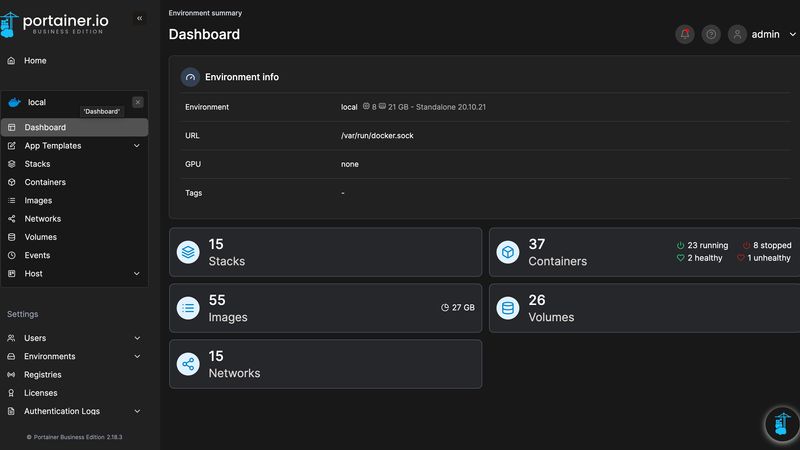
Navigate through Portainer’s intuitive dashboard, gaining a visual overview of containers, images, volumes, networks, and more. Simplify container management through a dynamic web-based interface.
User and Role Management
Portainer enhances security and collaboration with role-based access control. Tailor user permissions, ensuring that team members have precisely the level of access they need.
4. Unleashing Portainer’s Potential
In-Depth Portainer Integration
Advanced Deployment with Templates
Elevate your application deployment using Portainer’s template-based approach. Create container stacks with predefined templates, streamlining the process of deploying complex applications.
Portainer’s Kubernetes Integration
Portainer’s capabilities extend beyond Docker to Kubernetes. Manage Kubernetes clusters alongside Docker environments, providing a unified interface for both containerization platforms.
5. Evolving DevOps Practices
Bridging the Gap with DevOps
Docker and Portainer together exemplify the essence of DevOps. Achieve seamless collaboration between development and operations teams by harnessing containerization and efficient management.
Continuous Integration and Deployment
Explore how Docker and Portainer integrate seamlessly into CI/CD pipelines, enabling automated testing, deployment, and monitoring of containerized applications.
Conclusion: Your Path to Mastery
Mastering Docker and Portainer transcends knowing commands—it’s about unlocking the potential for efficient, scalable, and agile software development. By diving into Docker’s core concepts, advanced features, and complementing them with Portainer’s user-friendly interface and extended capabilities, you’re equipped to navigate the complex landscape of containerization and management with confidence.
Embrace continuous learning and hands-on exploration. Experiment with advanced Docker use cases, delve into Kubernetes orchestration, and extend Portainer’s integrations. With these skills, you stand at the forefront of modern DevOps, ready to architect, deploy, and manage applications that redefine the future of software.
Comments

About Blake Maxwell